Wednesday, August 29, 2007

keyCode table for Unicode standard

The following is a table defining the keyCode for particular key presses
With this table you can catch key presses using Javascript with the following:
//The javascript functions:
function InKeyRange(e, min, max)
{
  if (min == null)
    min = 0;

  if (max == null)
    max = 65000;

  if (max < min)
  {
    var tmp = min;
    min = max;
    max = tmp;
  }

  var keyCode = (is_nav) ? e.which : e.keyCode;
  return ((min <= keyCode) && (keyCode <= max));
}

// test if the keycode of the key pressed is a numeric key 0-9
function IsNumericKey(e)
{
  return InKeyRange(e, 48, 57);
}

//Call javascript functions from within a textbox
<asp:TextBox Runat="server" onkeypress="return IsNumericKey(event);" Width="35" ID="TB1"></asp:TextBox>

If the key pressed is not within the givin value, the textbox won't accept the input.

Now here is the table defining the keyCodes:


a = 97
b = 98
c = 99
d = 100
e = 101
f = 102
g = 103
h = 104
i = 105
j = 106

k = 107
l = 108
m = 109
n = 110
o = 111
p = 112
q = 113
r = 114
s = 115
t = 116

u = 117
v = 118
w = 119
x = 120
y = 121
z = 122
0 = 48
1 = 49
2 = 50
3 = 51

4 = 52
5 = 53
6 = 54
7 = 55
8 = 56
9 = 57
' = 39
, = 44
- = 45
. = 46

/ = 47
: = 58
= = 61
[ = 91
\ = 92
] = 93
` = 96
return = 13
escape = 27
space bar = 32

Tuesday, August 28, 2007

SQL raising errors as part of transaction

Here is an example of a sql stored procedure with a transaction which can raise an error and return if some condition is met, it will also catch an error from any called procedure and roll-back the transaction if necessary.


BEGIN TRAN

EXEC dbo.some_sql_function @variable

IF(some_condition)
BEGIN
  RAISERROR ('this %s doesn''t exist.', 16, 1, @errordesc)
  RETURN
END

IF (@@ERROR = 0)
BEGIN
  COMMIT TRAN
  SELECT 1
END
ELSE
BEGIN
  ROLLBACK TRAN
  SELECT -1
END

Friday, August 24, 2007

difference between left join and left outer join

There is no difference between a left join and left outer join (or right join and right outer join). The left/right join simply defaults to the left/right outer join. An explaination can be found on MSDN here

Thursday, August 23, 2007

add confirmation pop up to a repeaters link button

If you have a repeater that is creating a LinkButtons that you want the users action to be confirmed by a javascript confimation box, you can follow the following scheme:

1.) Create the repeater in the .aspx file and add the LinkButton:
    <asp:Repeater ID="aRepeater" Runat="server" >
  <ItemTemplate>
      <td>
        <#DataBinder.Eval(Container.DataItem, "title")%>
      </td>
  </ItemTemplate>
  <ItemTemplate >
    <asp:LinkButton Runat="server" ID="Btn" CommandArgument=%#DataBinder.Eval (Container.DataItem, "arg")%>
      Text
    </asp:LinkButton>
  </ItemTemplate>
</asp:Repeater>

2.) Add the javascript confirmation in the head that you want the LinkButtons to use:
<script language="javascript">
  function Confirm()
  {
    return confirm("Are you sure?");
  }
</script>

3.) Override the Repeaters ItemCreated event and add the attribute to the LinkButton:
private void Repeater_ItemCreated(object sender, RepeaterItemEventArgs e)
{
  LinkButton btn = e.Item.FindControl("Btn") as LinkButton;
  if (btn != null)
    btn.Attributes["onclick"] = "return Confirm();";
}

4.) Wire-up the delegate in the InitializeComponent section:
this.Repeater.ItemCreated +=new RepeaterItemEventHandler(Repeater_ItemCreated);

That's it.

Tuesday, July 31, 2007

Get keys out of Hashtable

You've filled up your Hashtable with key/value pairs, now how do you get the keys out? Below is a simple way using foreach:

protected Hashtable list = new Hashtable();

public void AddItem(int itemnum, string title, int cost, int quantity)
{
  Item i = new Item();
  i.Cost=cost;
  i.ItemId=itemnum;
  i.Quantity=quantity;
  i.Title=title;

  list.Add(itemnum, i);
}

public int GetTotal()
{
  int tot=0;
   IDictionaryEnumerator Enum = list.GetEnumerator();
  while(Enum.MoveNext())
{
     Item i = (Item)list[Enum.Key];
    tot+=(i.Cost*i.Quantity);
}

  return tot;
}

Monday, July 30, 2007

Add better ringtones to iPhones lacking alerts

The iPhone is lacking in the ringtone alert department. Take the half-hour set-up and spare yourself from drab incoming call alerts.

1.) Get yourself some tones you'd rather hear when a call comes in. Try this suggestion from tuaw which describes how to use iTunes clips for use as a ringtone.

2.) Once you've got a few tones, head over to Hack the iPhone and download iPhoneInterface. Here is the direct link to the download for Windows (XP and Vista). This tool is what you will use to upload your tones to the iPhone.

3.) Now that you have your tones and have uploaded them to your iPhone using iPhoneInterface, you simply navigate to Settings -> Sound > Ringtone on your iPhone and choose the new ringtone you just uploaded.

Friday, July 13, 2007

Could not find file InstallState

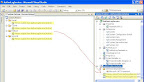
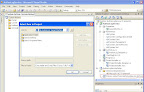
I created a Windows Service which needed installed onto the machine before I could test its functionality. I added a setup project (File > Add > New Project) and added the Setup Project under "Other Project Types". Everything built fine and I was ready to go until I started receiving the 'Could not find file...InstallState' when I tried to actually install the service. It took a half a day to figure out the problem, here is what I found. When you initially set up the project and go into Custom Actions to add primary output the project looks like this:

As you'll notice, there are too many primary active outputs. Delete all four from the left side under Install, Commit, Rollback, and Uninstall. If there are two under your setup file in Solution exporer (see highlights), then delete one or you will receive a some removed file error. The best way to do it is delete both and then right click the setup project (in solution explorer) go to Add > Project Output and set the service as primary output. You should then only have one listing under your setup project and none listed in the Custom Action section. Once your solution looks like the below, build and install.